SSO on Xerox Printer: Access the Cloud with One Badge
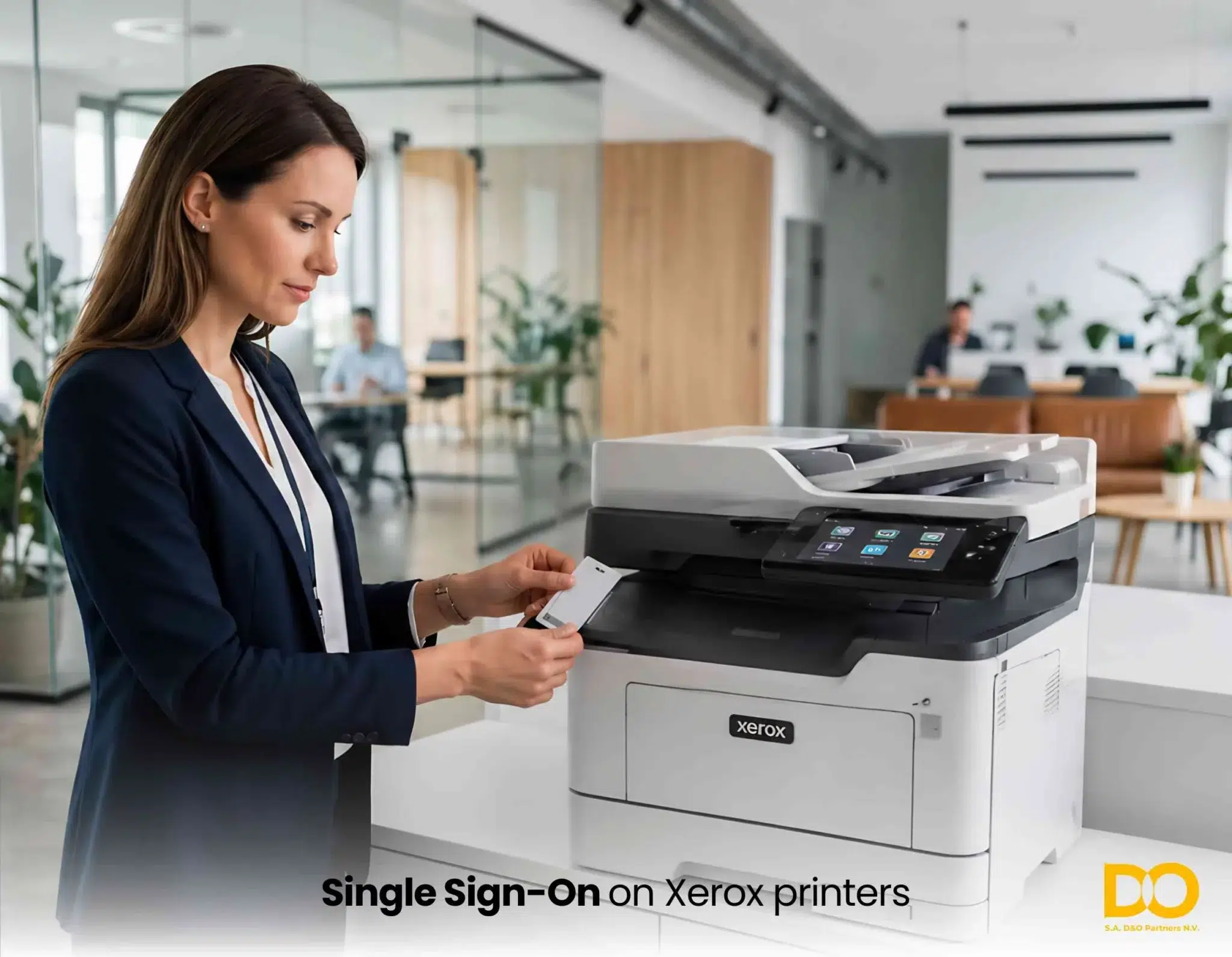
How Single Sign-On (SSO) and MFA authentication, integrated into Xerox multifunction copiers, are transforming cloud access management in Belgium — no password, no friction, no compromise on security.
What Is SSO on a Multifunction Copier?
Single Sign-On on a multifunction copier is a single-authentication mechanism that allows an employee to identify themselves just once — via a badge, PIN code, or Active Directory credentials — to access all authorized cloud applications from any Xerox copier in the fleet.
Without SSO, every copier is a barrier: users must manually enter their credentials for each cloud service (SharePoint, OneDrive, Google Drive, Dropbox…), multiplying the risk of errors, data breaches, and productivity loss. With an integrated SSO solution, this friction disappears entirely.
On Xerox copiers deployed by D&O Partners in Belgium, SSO is based on the SAML 2.0 (Security Assertion Markup Language) protocol, an open standard that delegates user authentication to the company’s identity provider (Azure AD, ADFS, Okta, Google Workspace…).
With or Without SSO: A Direct Comparison
| Criterion | Without SSO | With SSO Xerox / iXware |
| Authentication | Separate credentials per application | Single badge or PIN |
| Password reset | Frequent, high IT workload | Nearly zero |
| Cloud access from copier | Manual, risk of error | Automatic, secure |
| GDPR / NIS2 compliance | Partial traceability | Full traceability, audit log |
| User experience | Frustrating, time-consuming | Smooth, in < 5 seconds |
| IT team workload | High (password tickets) | Significantly reduced |
| MFA (Multi-Factor Authentication) | Hard to deploy per machine | Centralized, per group / role |
iXware: The Platform That Activates SSO on Your Xerox Copiers
iXware is the document flow management and access platform developed for Xerox copiers. It is the application layer that makes it possible to integrate SSO, MFA and cloud connectors (SharePoint, OneDrive, Google Drive, Dropbox, S3…) directly from the touchscreen panel of the multifunction copier.
Deployed and configured by D&O Partners in Belgium, iXware integrates into your existing environment without requiring an infrastructure overhaul. It communicates with your company directory via SAML 2.0 and supports the main identity providers on the market.
Key iXware Features for Cloud Authentication
Native SAML 2.0 SSO — Direct connection to Azure AD, ADFS, Okta, Google Workspace. The user’s identity is verified by the company’s identity provider, never stored locally on the copier.
Per-team configurable MFA — Multi-factor authentication can be selectively enabled based on role or group: badge only for standard prints, badge + PIN for scans to sensitive folders.
Ready-to-use cloud connectors — SharePoint Online, OneDrive for Business, Google Drive, Dropbox Business, Box, secure FTP — each connector is pre-configured and tested on approved Xerox copiers.
Centralized policy management — The administrator defines from a single console who can access what, from which copier, at what time — and consults a complete audit log for GDPR compliance.
Secure session and automatic logout — Each session opens on authentication and closes automatically after use or inactivity timeout. No personal data remains on the device between sessions.
Scan to Cloud & Print from Cloud with Single Sign-On
Once SSO is enabled on your Xerox copiers via iXware, two document workflows become immediately accessible to every authenticated user.
Scan to cloud: Scan directly to your personal space
The employee approaches the copier and authenticates via their badge or company credentials. The copier recognizes their identity and displays only their authorized cloud destinations. They select their OneDrive, SharePoint, or Google Drive folder and start scanning — the document goes directly to their personal space, named, time-stamped and encrypted in transit.
Key advantage: identity management guarantees that each user exclusively accesses their own storage space. It is technically impossible to accidentally send a document to a colleague’s space.
Print from cloud: Print a cloud file without a computer
From the copier’s touchscreen, the authenticated user browses their cloud applications, selects the file to print (PDF, Word, Excel, image…) and launches printing. No USB key, no intermediate computer, no email address required. The file is never transmitted in plain text: it is retrieved via a secure OAuth 2.0 API and printed directly from the cloud.
“With iXware SSO on our Xerox copiers, our teams access their OneDrive space from any copier in the building in under five seconds. Password resets related to copiers have dropped to zero.” — Field feedback from a D&O Partners client, services sector, Brussels.
How to Deploy SSO on Xerox Copiers in Belgium: The 5 Phases
D&O Partners guides every client from A to Z in implementing Single Sign-On on their Xerox fleet. Here is the structured process applied in Belgium:
Step 1 — Fleet and identity infrastructure audit
Inventory of Xerox copiers, identification of the existing identity provider (Azure AD, ADFS, Okta…), mapping of cloud applications used by teams.
Step 2 — Connector configuration
Setting up the trust relationship between the company’s identity provider and the iXware platform. This step ensures that user authentication is fully delegated to the central identity management system.
Step 3 — SSO activation and per-team MFA policies
Defining access rules by role: which user groups have access to which cloud applications, with what level of authentication (badge only, badge + PIN, full MFA).
Step 4 — Adding and testing cloud connectors
Configuration and validation of each connector (SharePoint, OneDrive, Google Drive, Dropbox…) on the fleet’s copiers. End-to-end tests: scan to, print from, session management.
Step 5 — User and administrator training
Onboarding session: employees master the badge → cloud selection → scan/print workflow in less than 10 minutes. The administrator learns to manage rights, consult audit logs, and add or revoke access from the iXware console.
Security, MFA and Regulatory Compliance
The solution offered by D&O Partners on Xerox copiers does more than simplify access: it actively strengthens the organization’s security posture and facilitates compliance with regulations in force in Belgium and Europe.
Multi-Factor Authentication (MFA): An Essential Layer of Protection
Multi-Factor Authentication (MFA) combines two or more factors to verify a user’s identity: something you have (badge, smartphone), something you know (PIN code), or something you are (biometrics). On Xerox copiers deployed by D&O Partners, MFA is configurable by group, application and data sensitivity level.
GDPR, NIS2 and Traceability
Every access to a cloud application from a copier is time-stamped, logged and linked to a named identity. This complete traceability directly meets the requirements of the GDPR (accountability, data minimization) and the NIS2 directive (risk management, access control). The administrator can export audit logs at any time.
GDPR | NIS2 | ISO 27001 | SAML 2.0 | OAuth 2.0 | Zero Trust | MFA
Frequently Asked Questions — SSO and Cloud Authentication on Xerox Copiers
What is SSO on a Xerox multifunction copier?
Single Sign-On on a Xerox copier is a single-authentication system that allows a user to identify themselves just once — via badge or company credentials — to access all authorized cloud applications (SharePoint, OneDrive, Google Drive…) without re-entering a password. On Xerox copiers deployed by D&O Partners in Belgium, this feature is activated via the iXware platform and the SAML 2.0 protocol.
How does MFA authentication work on a Xerox copier?
MFA (Multi-Factor Authentication) on a Xerox copier combines a first factor (NFC badge or credentials) with a second factor (PIN code, mobile notification). iXware allows you to configure the required MFA level based on the user group and the sensitivity of the targeted cloud resources.
Is iXware compatible with Azure AD and common identity providers?
Yes. iXware natively supports the main identity providers via SAML 2.0: Microsoft Azure AD (Entra ID), ADFS, Okta, Google Workspace, Ping Identity and others. The connector configuration is carried out by D&O Partners technicians and requires no technical intervention from the end user.
Which cloud applications are accessible from a Xerox copier with iXware?
With iXware deployed by D&O Partners, Xerox copiers can connect to SharePoint Online, OneDrive for Business, Google Drive, Dropbox Business, Box, secure FTP servers and other configurable destinations. Supported workflows include scan to cloud (scanning to the cloud) and print from cloud (printing from the cloud).
Does SSO on a Xerox copier help with GDPR compliance?
Yes. The iXware SSO solution on Xerox copiers contributes to GDPR compliance in several ways: each access is linked to a named identity and logged (accountability), data is never transmitted in plain text (encryption in transit), and access rights are managed centrally and immediately revocable.
How long does it take to deploy SSO on a Xerox fleet in Belgium?
Deployment time depends on the fleet size and the complexity of the existing identity infrastructure. For a fleet of 10 to 50 copiers with Azure AD already in place, D&O Partners typically completes the full deployment in 2 to 5 business days.
Is an IT infrastructure change needed to activate SSO on Xerox copiers?
No. The iXware solution integrates into the existing IT environment without infrastructure replacement. It connects to the identity provider already used by the company (Azure AD, ADFS, Okta…) and to cloud applications in production. No network overhaul is required.
D&O Partners: Your Xerox SSO Expert in Belgium
D&O Partners is the certified Xerox dealer in Belgium specializing in the deployment of intelligent print solutions and secure document management. Our expertise covers the entire lifecycle of your Xerox fleet: audit, SSO and MFA configuration, cloud integration, training and support.
What sets us apart: we don’t just deliver hardware — we build a functional, secure and compliant solution, tailored to your organization, your cloud applications and your internal security policies. Our certified Xerox and iXware technicians handle the full SSO configuration, MFA implementation and cloud connector integration.
Activating SSO and MFA on your Xerox copiers with iXware transforms every copier in your fleet into a secure access point to your cloud resources — no password, no friction, no compromise on compliance. User authentication should never be a barrier to productivity. With D&O Partners in Belgium, it becomes a competitive advantage.
Ready to deploy SSO on your Xerox copiers in Belgium? Contact D&O Partners for a free audit and a personalised iXware demonstration.