What is the difference between a Xerox A3 and A4 printer?
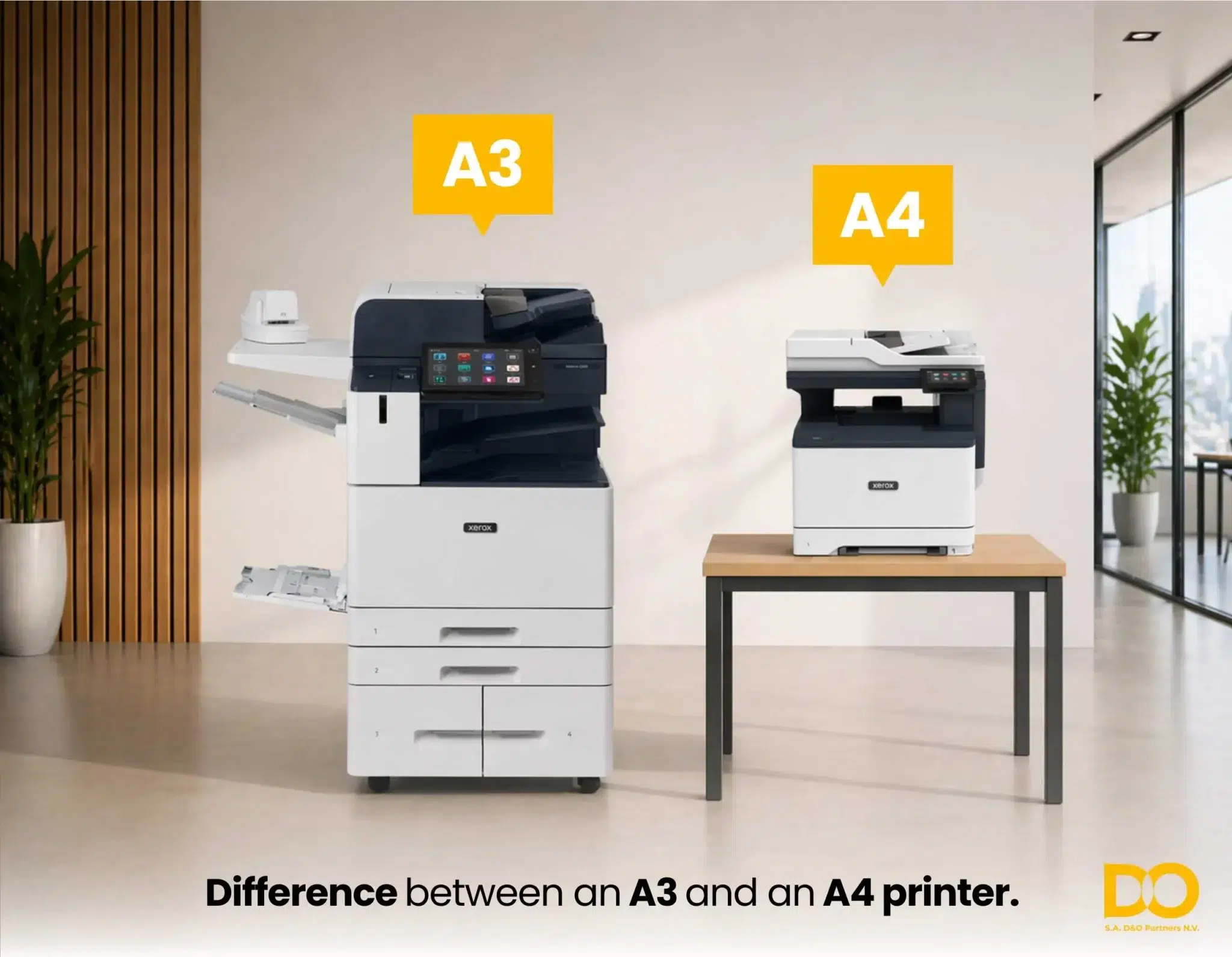
Are you torn between an A3 or A4 printer for your office? You’re not alone. It’s one of the most common questions we receive at D&O Partners. The difference goes well beyond the paper size: speed, features, cost and intended use all play a crucial role. In this article, we explain everything clearly and help you choose the right Xerox printer for your specific situation.
What are A3 and A4? Paper formats explained
Before diving into the printers themselves, it’s worth clarifying the paper formats. Both are part of the international ISO 216 standard for paper sizes.
A4
210 × 297 mm
- Standard office format
- Letters, reports, invoices
- Compact and lightweight
- Best-selling format worldwide
- Smaller device, less space required
A3
297 × 420 mm — 2× A4
- Exactly double the A4 format
- Plans, posters, spreadsheets
- Larger device, more space required
- Higher purchase price
- Ideal for graphic and technical work
Good to know: An A3 printer can always print on A4 as well. The reverse is not true: an A4 printer can never print on A3. If you need A3 even occasionally, an A3 printer is the safe choice.
What is the concrete difference between an A3 and A4 printer?
The paper format is just the starting point. Several other factors distinguish A3 and A4 printers in professional use:
| Criterion | A4 Printer | A3 Printer |
| Max. paper format | 210 × 297 mm | 297 × 420 mm |
| Physical size | Compact, desktop model | Larger, requires more space |
| Print speed | 25–65 ppm (A4) | 30–72 ppm (A4 equiv.) |
| Monthly volume | Up to ±65,000 p/month | Up to 300,000 p/month |
| Paper tray capacity | Limited (1–3 trays) | Extensive (multiple trays) |
| Finishing options | Basic (duplex, stapling) | Advanced (stapling, hole-punch, booklets) |
| Purchase price | Lower | Higher |
| Cost per page | More expensive than the A3 | Identical with D&O all-in contract |
| Security | Good (ConnectKey) | Advanced (ConnectKey + White List) |
| Ideal for | SMEs, small teams, standard use | Large teams, intensive use, graphic work |
Worth noting: At D&O Partners, with our all-in maintenance contract, you pay the same price per page for both A4 and A3 prints. This makes an A3 printer financially more attractive than you might expect.
When should you choose an A4 printer?
An A4 printer is the right choice for most office environments. The Xerox VersaLink range offers excellent A4 multifunction printers equipped with ConnectKey technology for smart workflows, cloud integration and advanced security.
Choose an A4 printer if you…
- Primarily print letters, invoices, reports and emails
- Have a small or medium office (2 to 15 users)
- Are looking for a compact printer that takes up little space
- Work in a hybrid or home working environment
- Have a limited monthly volume (up to ±5,000 pages)
- Deliberately choose a lower purchase price
- Also occasionally need to scan and copy
The Xerox VersaLink C415 is a popular example: a compact A4 colour multifunction with Wi-Fi, duplex, ConnectKey and an intuitive touchscreen. Perfect for the modern office that wants to work efficiently and securely without compromising on functionality.
When should you choose an A3 printer?
An A3 printer becomes essential once your documents exceed A4 format or when your volume and finishing requirements are higher. The Xerox AltaLink range is the benchmark for professional A3 multifunction printers, designed for medium to large organisations.
Choose an A3 printer if you…
- Regularly print plans, drawings, posters or large spreadsheets
- Work in architecture, engineering, marketing or the graphic sector
- Have a large team (15+ users) with intensive use
- Need advanced finishing options (stapling, hole-punching, booklets)
- Have a high monthly volume (more than 5,000 pages)
- Are looking for the lowest cost per page at high volumes
- Want to compare or print two A4 documents side by side
Xerox A3 printers also offer faster single-pass duplex scanning, which saves enormous amounts of time when processing large stacks of documents. The AltaLink range also features a larger adjustable screen, more memory and more advanced security features such as the White List, which continuously monitors the system for unauthorised applications.
Xerox A4 and A3 printers: the best models in 2026
D&O Partners offers a comprehensive range of Xerox printers and consumables. Here are the most popular models by category:
Xerox VersaLink A4 Printers
The Xerox VersaLink range combines compactness with smart features. Ideal for SMEs and hybrid workplaces.
- VersaLink C415 – colour, 35 ppm, Wi-Fi, duplex
- VersaLink C625 – colour, 52 ppm, 7″ touchscreen
- VersaLink B625 – monochrome, high volume, AI
- VersaLink B620 – compact, hybrid office
Xerox AltaLink A3 Printers
The Xerox AltaLink range is designed for high volumes, large teams and advanced document workflows.
- AltaLink C8130 – colour, 30 ppm, up to 90,000 p/m
- AltaLink C8155 – colour, 55 ppm, up to 250,000 p/m
- AltaLink C8170 – colour, 70 ppm, up to 300,000 p/m
- AltaLink B8145 – monochrome, 45 ppm
VersaLink C71xx — the best of both worlds
The Xerox VersaLink C7120, C7125 and C7130 are A3 printers from the VersaLink family. They offer the compactness and user-friendliness of the VersaLink range combined with the A3 capabilities that larger organisations need. Ideal for those who want to upgrade from A4 to A3 without switching to the heavier AltaLink class. Browse our complete range of A3 and A4 multifunction printers.
Decision guide: A3 or A4 — what suits your business?
Answer the questions below to quickly discover which format best suits your situation:
Follow this guide to choose the right printer for you
How many pages do you print on average per month?
Up to 5,000 → A4
5,000–10,000 → A3 or A4
More than 10,000 → A3
Do you need A3 prints?
Never → A4
Sometimes → A3 (can also A4)
Regularly → A3
How many users share the printer?
1–10 users → A4
10–25 users → A3 or A4
25+ users → A3
What do you primarily print?
Letters, invoices, reports → A4
Plans, drawings, posters → A3
Both → A3 (can do everything)
In which sector are you active?
Administration, HR, finance → A4
Architecture, construction, graphics → A3
Law, marketing, education → A3 or A4
Still not sure? Our experts at D&O Partners are happy to help. Request a free demonstration at our showroom in Ixelles and discover the difference between Xerox A3 and A4 printers first-hand.
Cost and maintenance: A3 vs A4
The total cost of a printer goes well beyond the purchase price. Here is an overview of the financial aspects:
Purchase price
An A4 printer is generally cheaper to purchase than a comparable A3 model. The more compact hardware and simpler paper mechanism make the difference. However, this gap is smaller than often imagined for Xerox devices of equivalent quality.
Cost per page
With a Managed Print Services contract via D&O Partners, you pay the same price per page for both A4 and A3 prints. This makes A3 printers financially more attractive than with other suppliers, where A3 often costs more.
Maintenance and consumables
Both formats require regular maintenance and toner replacement. Via our technical service and consumables, we ensure automatic replenishment and rapid intervention. You never have to order toners yourself: the system automatically detects when replenishment is needed.
Leasing or all-in contract
Both A3 and A4 printers are available via leasing or an all-in contract. You pay a fixed monthly cost including maintenance, service and toners — and always have access to an up-to-date device.
Worth knowing: Through Xerox Managed Print Services (MPS), you get complete transparency on your print costs. The reporting solutions give you a clear overview of your printing habits so you can identify opportunities for savings.
Which printer best suits your business?
Our experts analyse your printing needs and advise you on the ideal Xerox solution — A3, A4 or both. Free advice, demo on request.
Frequently asked questions
Can an A3 printer also print on A4?
Yes, absolutely. An A3 printer can print on both A4 and A3. You therefore have complete flexibility. An A4 printer, however, can never print on A3. If you need A3 even occasionally, an A3 printer is the logical choice.
Is an A3 printer much more expensive than an A4?
The purchase price is higher, but the difference in daily running costs is smaller than you might think. At D&O Partners, with an all-in leasing contract, you pay the same price per page for A4 and A3 prints. In the long run, an A3 printer is often more cost-effective for businesses with high volumes.
What is the difference between Xerox VersaLink and AltaLink for A3?
The VersaLink C71xx range offers A3 in a more compact format, ideal for smaller teams that occasionally need A3. The AltaLink range is designed for intensive A3 use with higher speeds, greater paper tray capacity and more advanced finishing options.
Can I lease an A3 printer from D&O Partners?
Yes. Both A3 and A4 printers are available via leasing or an all-in contract. You pay a fixed monthly cost including maintenance, toners and technical interventions. Our experts will help you put together the formula that best fits your volume and budget.
Which sectors typically need an A3 printer?
Sectors that frequently need A3 include: architecture and construction (plans), marketing and communications (posters, campaigns), education (course materials, presentations), law firms (large contracts side by side) and the public sector (reports, maps). For standard office environments, an A4 multifunction printer usually suffices.
Conclusion: A3 or A4 — the choice depends on your use
There is no universal answer to the question of which format is better. The right choice depends on your print volume, document types, number of users and budget.
Opting for an A4 printer via the Xerox VersaLink range? You get a compact, user-friendly and intelligent printer that is perfect for most office environments. Opting for an A3 printer via the Xerox AltaLink range? You have a powerful multifunction system that handles your most demanding print requirements — including A4.
Still unsure? Contact our experts at D&O Partners. We analyse your situation and advise you on the Xerox printer that perfectly matches your needs — whether you buy, lease or opt for a fully managed print solution.